AWS Marketplace offers third-party Software-as-a-Service (SaaS) products that help organizations reduce operational costs and deployment time. Organizations, from startups to enterprises, can quickly find, evaluate, and subscribe to third-party SaaS solutions through a streamlined procurement process. These solutions eliminate infrastructure management overhead and accelerate time-to-value for business applications.
When listing new products, sellers need to complete the SaaS integration requirements. In this post, we focus on the specific steps needed to integrate SaaS products. This post guides you through the integration requirements for listing your SaaS product in AWS Marketplace. It serves as a complement to our existing resources, including a SaaS quick start, supporting documentation, and labs.
AWS Marketplace SaaS integration consists of several sequential steps. The ResolveCustomer API validates customers by exchanging tokens for customer IDs. The GetEntitlement API verifies contract dimensions, while Amazon Simple Notification Service (Amazon SNS) topics monitor subscription changes. AWS Marketplace offers both standard and consumption-based pricing models, with vendors tracking usage through the BatchMeterUsage operation. This integration delivers secure authentication and access management while streamlining the customer onboarding process.
We will go through the process of completing a SaaS integration and use an example to showcase what is needed for a SaaS contract with consumption product.
You must have completed the following prerequisites:
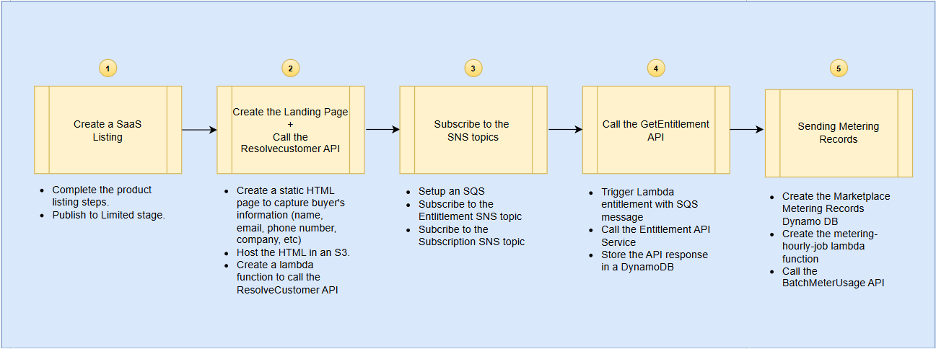
Figure 1: SaaS integration flow diagram
Customers subscribe to your SaaS product in AWS Marketplace. AWS Marketplace redirects customers to your registration landing page. You host and manage this landing page within your AWS infrastructure, which initiates the customer onboarding process. On the landing page, customers can create their accounts, begin product configuration, and access your service environment.
Set up a registration landing page within your AWS infrastructure and provide the URL to your SaaS listing. Configure the page to accept and process the x-amzn-marketplace-token.
After a customer subscribes to your product, they will be redirected to the fulfillment URL (your landing page). The redirect is a POST request and includes a temporary token, valid for 4 hours.
The following diagram shows the workflow to verify new customers in step 2 above.
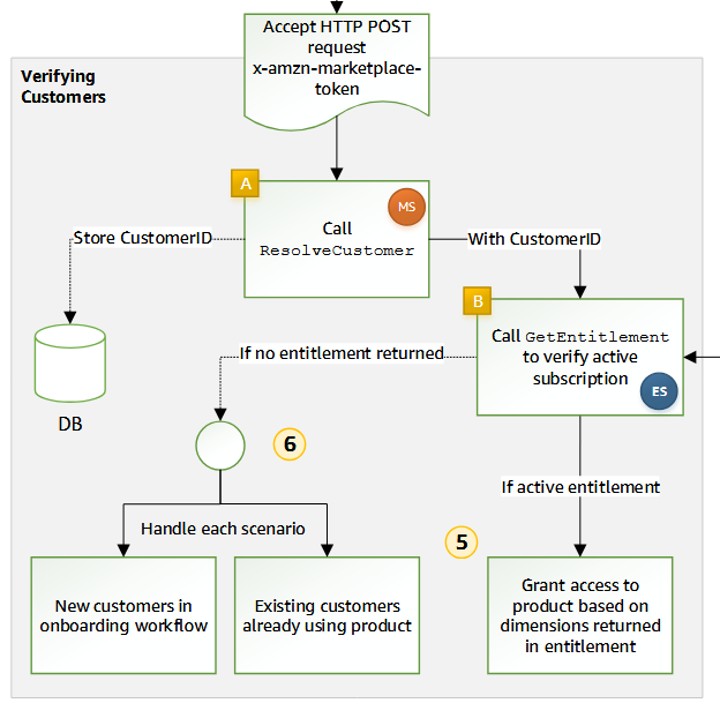
Figure 2: AWS Marketplace customer verification and entitlement check process flow
Your SaaS integration needs to exchange the token for a customerID by calling the ResolveCustomer API in the AWS Marketplace Metering Service.
The following code example is the request you submit. Add in the regToken value for your use case:
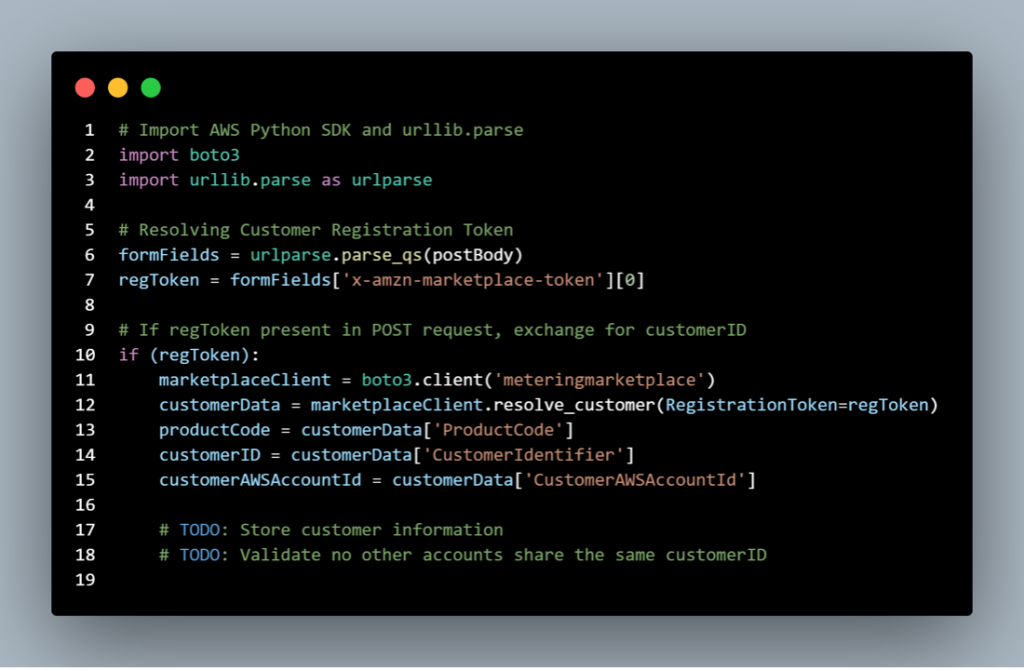
Figure 3: Sample code to exchange token for customer ID
The following is the response from AWS Marketplace:
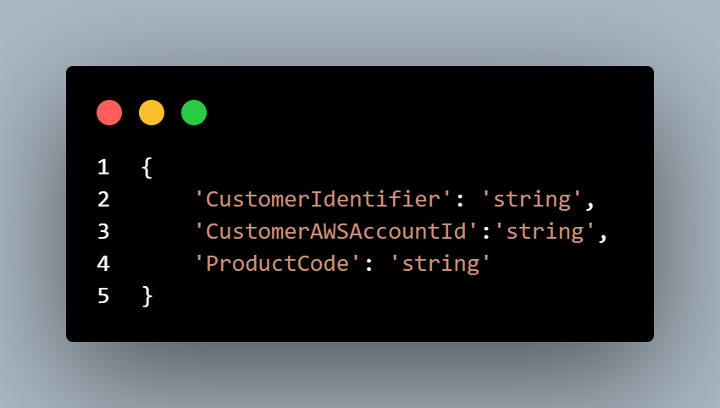
Figure 4: Response from AWS Marketplace after exchanging token for customer ID
After obtaining a customerID, persist it in your application or database for future calls.
With the customerID, call GetEntitlement in AWS Marketplace Entitlement Service to verify which dimension the customer is subscribed to and the quantity, if applicable. This is shown in the next step.
Set up the Amazon Simple Queue Service (SQS) queue and subscribe to the SNS topics. This provides notifications about changes to customer’s subscription and entitlement statuses. This indicates when to provide and revoke access for specific customers. Possible scenarios include unsubscribes, upgrades, renewals, and failed subscription.
This SQS queue policy allows AWS Marketplace to send entitlement notifications to your queue. To send the sqs message, enter the following command.
The following code example is the request from your SaaS integration:
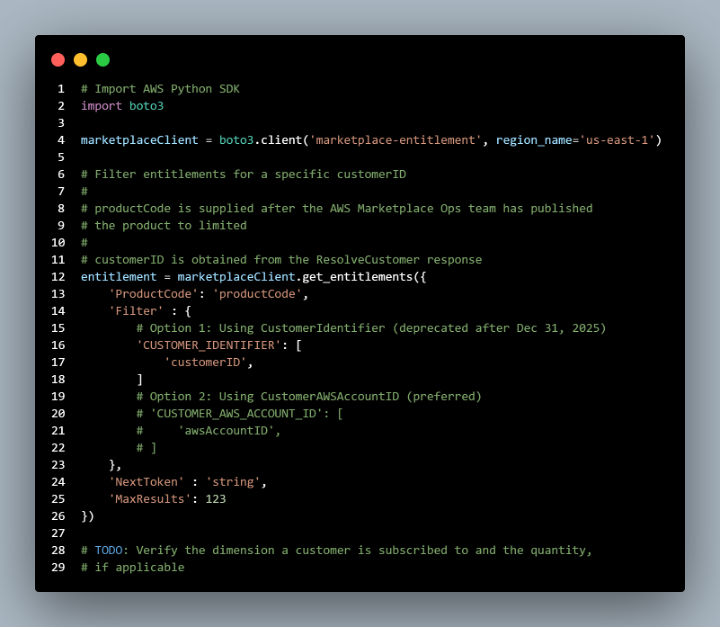
Figure 5: Request from SaaS integration
The following code is the response from AWS Marketplace:
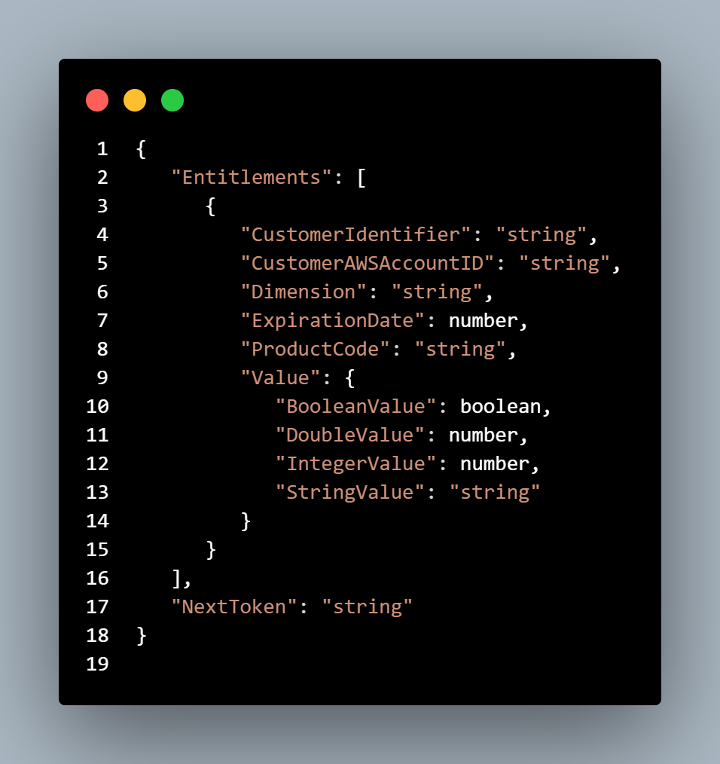
Figure 6: Response from AWS Marketplace
If the entitlement is active, grant access to the buyer based on dimensions and contract duration returned in entitlement. If no entitlement is returned from GetEntitlement, either during onboarding or ongoing verification, determine how to manage access.
Each time the entitlement is updated, you will receive the message on the SNS topic. The Lambda function entitlement-sqs.js on each message is calling the marketplaceEntitlementService and storing the response (CustomerIdentifier and the ProductCode) in DynamoDB. We’re using the same DynamoDB stream to detect changes in the entitlement for SaaS contracts.
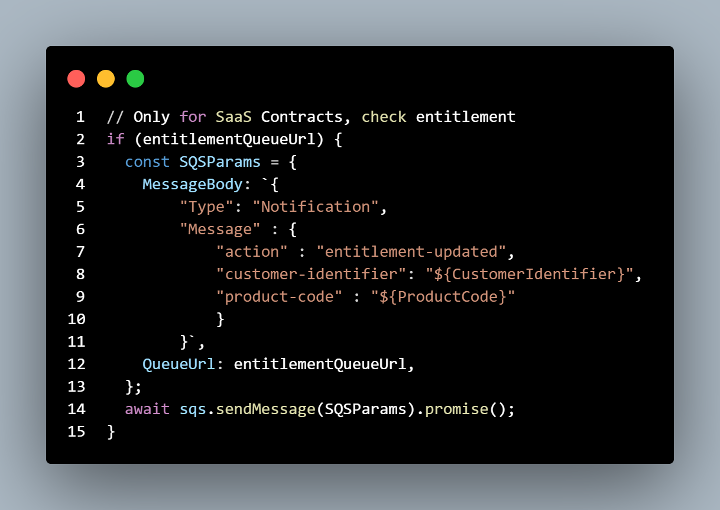
Figure 7: Checking entitlements
Implement partition creation and product configuration workflows after verifying the new customer if your workflow handles automation. If your SaaS platform doesn’t offer automatic onboarding, include a message on your landing page to inform the buyer that a representative will contact them in a set period to start the platform onboarding process.
For AWS Marketplace SaaS subscriptions, sellers must meter customer usage for AWS billing purposes. With standard subscriptions, all usage is metered. For SaaS contracts with consumption, metering only applies to usage exceeding contract entitlements. When metering, your application reports usage quantities to AWS based on your predefined pricing dimensions, such as data transferred or scanning activity.
Create an Amazon CloudWatch Events rule called MeteringSchedule that triggers hourly. This rule executes the metering-hourly-job.js script, which performs two main functions:
The AWSMarketplaceMeteringRecords table requires programmatic updates from your SaaS application. To enable this, grant appropriate write permissions to your usage data collection service for the AWSMarketplaceMeteringRecords table.
The AWS Lambda function metering-sqs.js sends queued metering records to the AWS Marketplace Metering service. After every call to the batchMeterUsage endpoint, the rows are updated in the AWSMarketplaceMeteringRecords table, with the response returned from the Metering Service, which can be found in the metering_response field. If the request was unsuccessful the meteringfailed value with be set to true and you will have to investigate the issue the error will be also stored in the metering_response field.
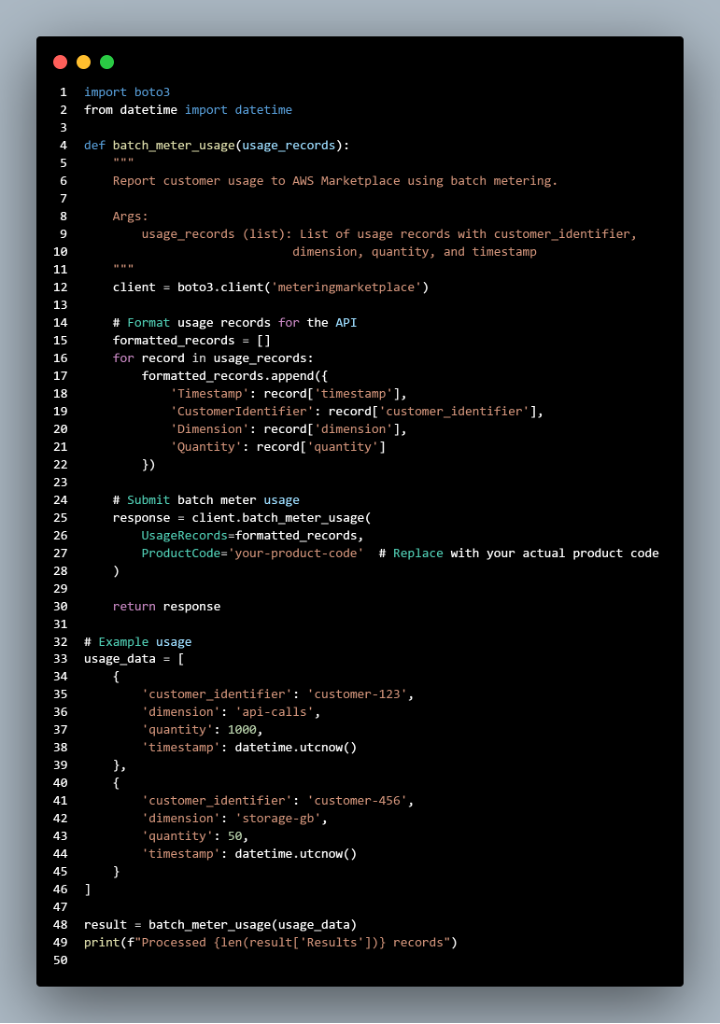
Figure 8: Code sample for batch metered usage
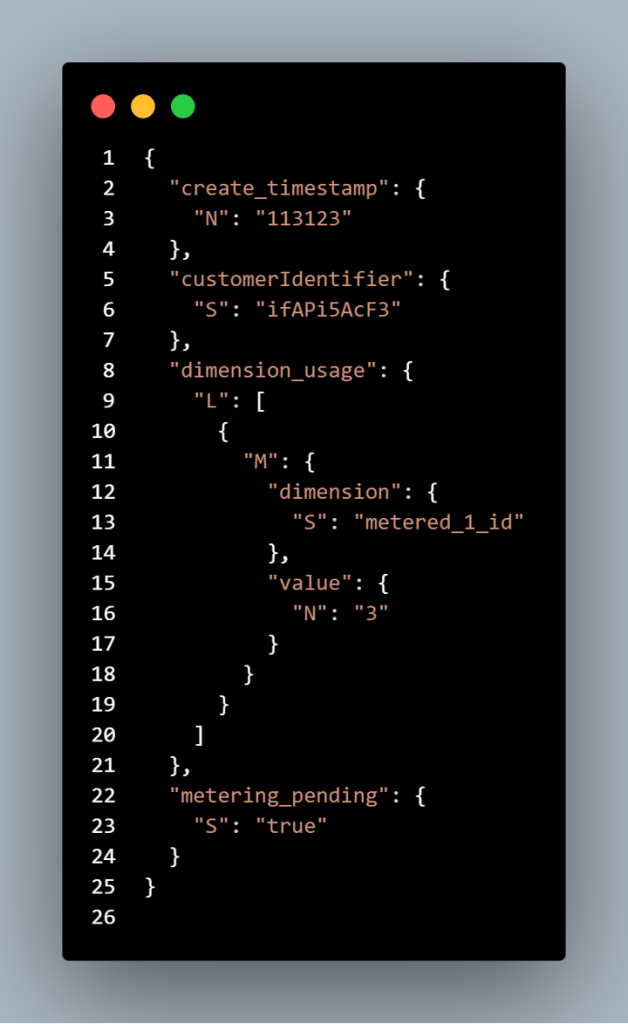
Figure 9: Record stored table format
The table uses two key components for its primary key: customerIdentifier serves as the partition key, while create_timestamp functions as the sort key. Together, these form the complete primary key. The new records format is in DynamoDB JSON format, which is different than JSON. The accepted time stamp is UNIX timestamp in UTC time.
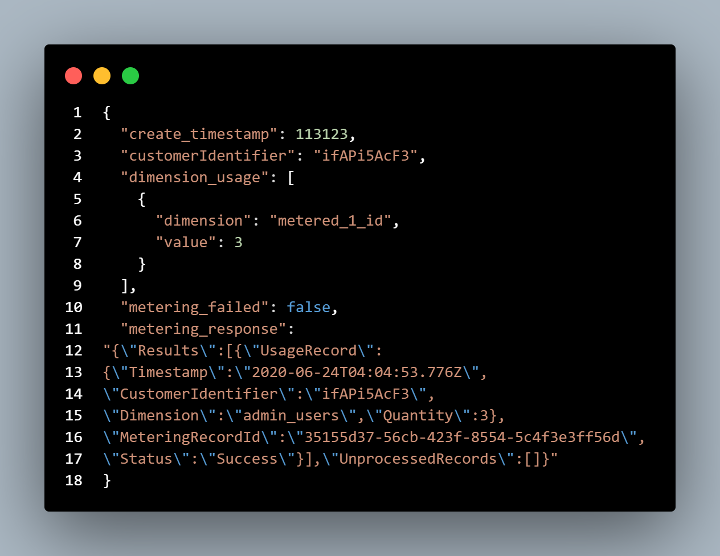
Figure 10: Record submitted to AWS Marketplace
Testing the AWS Marketplace buyer journey after integration ensures smooth customer experience and proper AWS service connections by simulating the complete customer lifecycle and verifying key API functionality.
This guide explains the Software-as-a-Service (SaaS) integration process with AWS Marketplace. To begin selling your SaaS products, list them in AWS Marketplace and complete the integration requirements. AWS Marketplace connects you directly with AWS customers, provides automated billing, and simplifies procurement processes. For more resources on listing SaaS products in AWS Marketplace review our labs and official documentation. If you have questions about your listings, you can use the contact us webform in your AWS Marketplace seller account to submit a ticket.
Tuan Vo is a Marketplace Specialist Solutions Architect who focuses on supporting sellers to list their products on AWS Marketplace. He supports large enterprises and public sector customers. Outside of work, Tuan enjoys traveling, trying out new food, and going on walks.
Yvan serves as an AMER Partner solutions architect at Amazon Web Services (AWS), where he spearheads AWS Marketplace adoption and multi-party initiatives across the AMER Partner Management organization. When not architecting cloud solutions, he channels his passion into jazz music, content creation, and maintaining an active lifestyle through running.